Get your systems working together
Connect any source to any destination. ahabFlow receives CSV, XML and e-invoices from workstations, business applications, mailboxes and database servers. It transforms and validates the data before delivering it to your ERP, DMS, database, file storage or email system. You can keep your existing ERP and build workflows without programming. The Hub provides central monitoring from outside your network, while local Workers process the data within your own IT infrastructure. You retain control over internal systems and data.
Request a free process review AI-generated
One process, end to end.
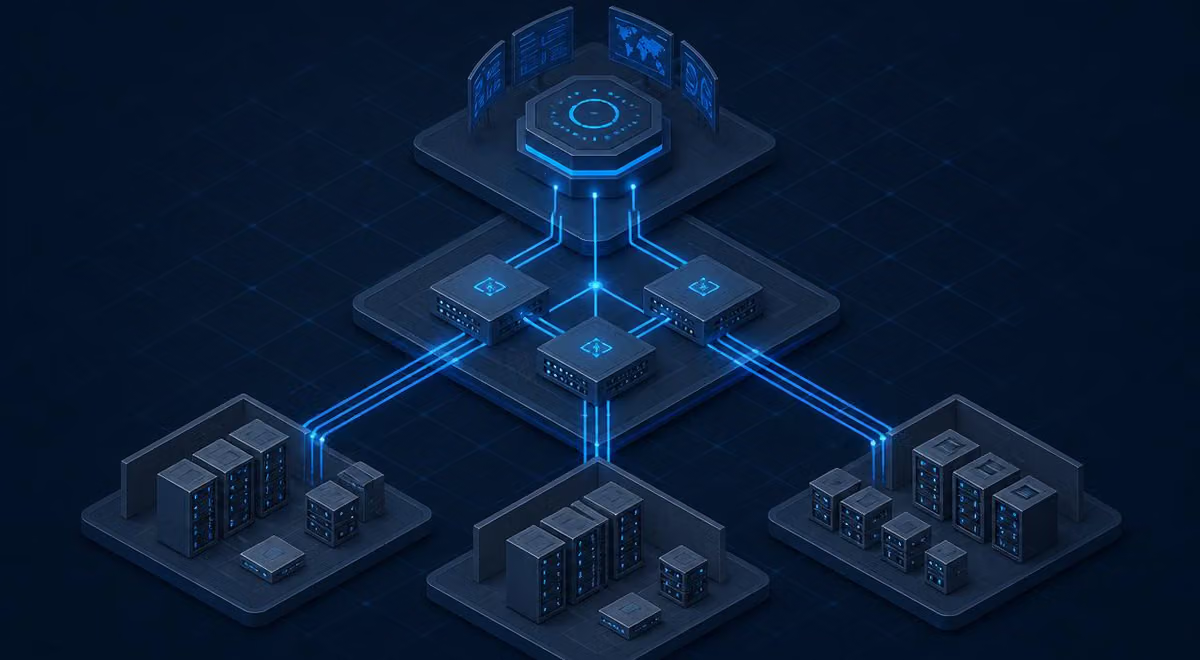
The diagram shows source systems, Workers and destinations, with the Hub outside your network. The two switches let you view data processing and monitoring separately.
Connect your source and destination systems.
Supports on-premises operation and multiple tenants, with a complete audit trail.
- DMS
- ERP
- DATEV
- SAP
- Salesforce
- Microsoft 365
- SharePoint
- SQL Server
- PostgreSQL
- REST-APIs
- SFTP
- File storage
- Archive systems
- AI services
- Other destinations
An event triggers the workflow. ahabFlow handles the rest.
Two monitored workflows in detail. One generates, emails and archives a ZUGFeRD invoice from a database view. The other enriches XML and a PDF with database values before archiving them.
A schedule or database event triggers the workflow. The Worker reads the view and generates a valid ZUGFeRD invoice (structured XML and PDF/A-3). It validates the schema and required fields, emails the invoice, and stores it in the archive with an index.
Sensors log processing time, validation results, SMTP acknowledgements and archive IDs. Failed steps are retried or escalated.
The Worker monitors an incoming folder for an XML file and its matching PDF. It reads the structured XML and adds values from a database.
The Worker sends the document and metadata to the archive. After the archive confirms receipt, it moves the files to a backup folder and timestamps each step so files can be tracked and duplicate processing avoided.
Respond automatically when something changes.
ahabFlow monitors systems and workflows and responds according to your rules before anyone needs to call.
The Worker checks the service at regular intervals. If it fails to respond, the Worker restarts the service, often before anyone notices the outage. It logs each attempt and result with a timestamp.
If the service remains unavailable after the retries, the Worker emails log files and system details to the external service provider and informs you at the same time.
If–then rules
Four examples of rules that trigger a process.
- 1
If an overnight import fails
Retry it, verify the result and notify the owner
- 2
If there is less than 10% space on the server
Clean up temporary files, move older data and report the result
- 3
If an interface stops returning data
Reconnect, catch up from the last successful run and log the gap
- 4
If an invoice is missing required fields
Set it aside, notify the person responsible and record the event
What ahabFlow monitors and how it responds
What it monitors
- Services
- Processes
- Event logs
- Storage space
- CPU and memory
- Files and folders
- Database queries
- Mailboxes
- Web Services & APIs
- Certificates
- Backups
- Print queues
- And more
What happens next
- Restarting the service
- Executing the script
- Move the file
- Repeat import
- Transfer of data
- Creating a document
- Send e-mail
- Create a ticket
- Archiving
- Cleaning
- Request approval
- And more
The catalogue grows with you. We can develop additional sensors and actions on request.
Workflows that already run automatically
Process incoming invoices without retyping
E-mail → Recognize invoice → AI/OCR → Check data → ERP → DMS
From email to accounting without manual data entry
File documents automatically
Monitor directory → classify → metadata → DMS import → clear source
Clear incoming folders automatically
Match records and documents
Read query → convert → assign document → import → write back status
Keep documents with the records they belong to
Connect third-party systems without custom development
Recognize file → read → generate JSON → call interface → log
Connect systems in days
Secure data exchange with partners
Check SFTP → Get files → Process → Target system → Archive successful files
Traceable, even months later
Detect failures before users call
Checking System & Service → Detect errors → Restart → Escalate in case of another error
Automatically detect and report faults before users notice them.
Six common workflows from projects with mid-sized businesses, IT service providers and public-sector clients.
Generate ready-to-send e-invoices from CSV, a database view or JSON.
ahabFlow creates an XRechnung or ZUGFeRD invoice from structured sources such as a CSV file, database view, JSON or an API response. It reads the data, adds and validates required fields, generates XML and sends the invoice with the PDF/A-3 through the customer’s email system. It then archives the invoice and its metadata.
- since 2025
Required ability to receive
Every company must be able to receive and process e-invoices.
- from 2027
Issuing requirements for larger businesses
Larger businesses must issue e-invoices for domestic B2B transactions in Germany.
- from 2028
Issuing requirements for most businesses
Most businesses must issue e-invoices regardless of size.
- Ongoing
Archiving and proof
Archive issued invoices and retain proof of delivery.
From data to an e-invoice
- XRechnung
- ZUGFeRD
- CSV / DB-View / JSON
- Validate required fields
- Mail delivery
- GoBD-compliant archiving
Post invoices from XRechnung and ZUGFeRD
Structured invoices in XRechnung or ZUGFeRD format can arrive by email, through a portal or in a folder. ahabFlow identifies the format and content, validates the required fields and sends structured data to the ERP. It then renames the file (for example, Supplier_InvoiceNumber_Date.pdf) and stores it in the file system or a DMS with an audit trail.
- Recognize format and content
- Checking mandatory fields
- Structured data transferred to ERP
- Rename the file and archive it with an audit trail
 AI-generated
The processes still run. Few people know exactly how.
Workflows built up over years keep the business running until one fails, an employee leaves or requirements change.
“A script has done this for years. The person who wrote it has long since left.”
Batch files, services and scheduled jobs run on different servers. Nobody has a complete picture of what runs where.
“It was only noticed when the accounting department complained.”
An interface had been down for two days before anyone saw the problem.
“Every morning export, check, rename, upload.”
Repetitive manual work takes time, and errors often go unnoticed.
Everything that has to happen between your systems.
One platform for workflows that previously relied on individual tools and their maintainers.
Workflows built from reusable steps
Build workflows from reusable components. They can be reviewed, versioned and maintained without writing code.
Monitoring included
See run times, errors and failed systems in one place. Escalate by email before users notice.
Converting data
Convert XML, JSON, CSV, database records and e-invoices. Rename, calculate, filter and validate fields.
Databases and Interfaces
SQL Server, PostgreSQL and MySQL by query or procedure. Modern systems via REST, HTTP and JSON.
Files, SFTP & Documents
Monitor directories, transfer files, classify PDFs and TIFFs, extract metadata, archive.
Mailboxes and sending
Process incoming emails and attachments, and send status updates and approval requests automatically.
Use AI where workflows need it.
AI can classify documents, extract suppliers and amounts, interpret free text and match data. The result then goes through your established validation rules.
- 1 New invoice in the mailbox
- 2 AI recognizes document type, supplier, amount
- 3 Rule-based validation and approval
- 4 Transfer to ERP and DMS
- 5 Custom logic through your own scripts
Optional AI processing
An AI model is not part of ahabFlow. It is provided or licensed separately – in-house or through a provider of your choice. ahabFlow only integrates it as a work step.
Your data stays where it belongs.
Three components support cloud and on-premises deployments. Either deployment can be managed by us or operated and monitored by you.
Worker 01
Each Worker is a full execution node. It receives, transforms, validates and delivers data and monitors connected systems, services and workflows through its sensors. Processing runs on the server where the Worker is installed. Deploy multiple Workers on one server or across several servers.
Connector 02
The Connector coordinates Workers, distributes tasks and synchronises status across your environment.
Hub 03
Use the Hub to design workflows, configure sensors and jobs, and manage monitoring, logs, roles and tenants. Run it in your infrastructure or choose a managed service.
Where ahabFlow runs and who monitors it
Choose a deployment and decide who will operate it.
- Cloud: run it in the cloud, managed by us or by your team.
- On-premises: run it on your infrastructure, managed by us or by your team.
- Choose who monitors your workflows and handles alerts.
 AI-generated
A workflow is an automated process.
Choose annual billing in advance or a Flex contract you can cancel monthly. The licence calculator estimates the price based on documents, workflows, monitoring points, tenants and optional AI processing. Every plan includes updates and product support.
Starter
1 workflow
- 50 monitoring points included
- Central monitoring and logging
- Email notifications when faults occur
Business
5 workflows
- 100 monitoring points included
- AI steps and custom scripts
- E-invoicing in XRechnung and ZUGFeRD formats
- Roles, approvals and history
Enterprise
20 workflows
- 200 monitoring points included
- Multi-tenant support and partner programme
- Operating fully in your environment
- Agreed response times
Need support with monitoring?
We set up and maintain monitoring, define thresholds and rules with you, and review alerts that ahabFlow cannot resolve automatically.
Managed S
Up to 50 monitoring points
5-8 servers · 2 standard workflows
Managed M
Up to 150 monitoring points
15–25 servers · 5 standard workflows
Managed L
Up to 300 monitoring points
30–50 servers · 10 standard workflows
Enterprise Managed
Over 300 monitoring points
For larger or critical environments
The minimum term is 12 months. Initial setup is included and depends on the size and complexity of the environment. It typically takes six to ten hours in smaller environments. Large installations can require two to three hours per server.
Packages include support for the listed standard workflows. Custom workflows are billed according to the work involved. The service has a minimum term of 12 months.
What is included in Managed Monitoring?
Included
- First setup of standard sensors
- Definition of the threshold values
- Establishment of notification rules
- Setting up simple response rules
- Adaptation of existing sensors and threshold values
- Technical condition monitoring by ahabFlow
- Review of relevant ahabFlow alerts during agreed service hours
- Check whether configured responses ran successfully
- Help identifying the cause of a fault
- Central Overview and Logging
- Support for the included standard workflows
Not included
- troubleshooting the operating system
- Troubleshooting ERP, DMS or business applications
- Vendor support
- Development of new individual interfaces
- Extensive script development
- Major changes to existing workflows
- Creating new individual workflows
- 24/7 on-call support
For example, ahabFlow detects that a SQL Server service has stopped. A rule attempts a restart, checks the result and notifies ahab IT and the customer if required. If the service still fails to start, we can investigate further as a separate IT service.
Frequently asked questions
Do we need to replace our existing systems?
No. ahabFlow connects your existing ERP, DMS and business systems and automates the handovers you handle manually or with scripts today.
Can individual systems also be connected?
Yes, if the system offers a database connection, file storage, SFTP, email or an API. We can develop additional components on request.
What happens to our existing scripts?
You can add existing scripts as workflow steps and monitor, log and manage them centrally.
Does ahabFlow have to run in the cloud?
No. You can choose managed operation or run the entire system, including central management, on your own infrastructure.
Is this only for documents?
ahabFlow also processes structured data and monitors systems, services and interfaces.
How soon can the first workflow go live?
Typical processes start on the basis of a template. Setting up an individual workflow starts at 249 €.
Which process would you like to automate?
Tell us about a process you handle manually or with scripts. Our DMS and integration specialists will show you how it could work in ahabFlow, generally within one business day. This free review is also available to partners and IT service providers.
Request a process review